Exploration
The Last Caretaker Sonar: How the Scan-50 Works, Where to Put It and the Deep Scan-500 Add-On
The Scan-50 Sonar shows the seabed in green up to a 50 m scan range and marks ores and other objects with a + sign, including things below the seabed. It scans in the direction it faces, so players set it up in or beside the wheelhouse facing forward. It unlocks at skill Tier 15, and the Deep Scan-500 Add-On (Tier 23) fits on its back to show much more of the terrain.
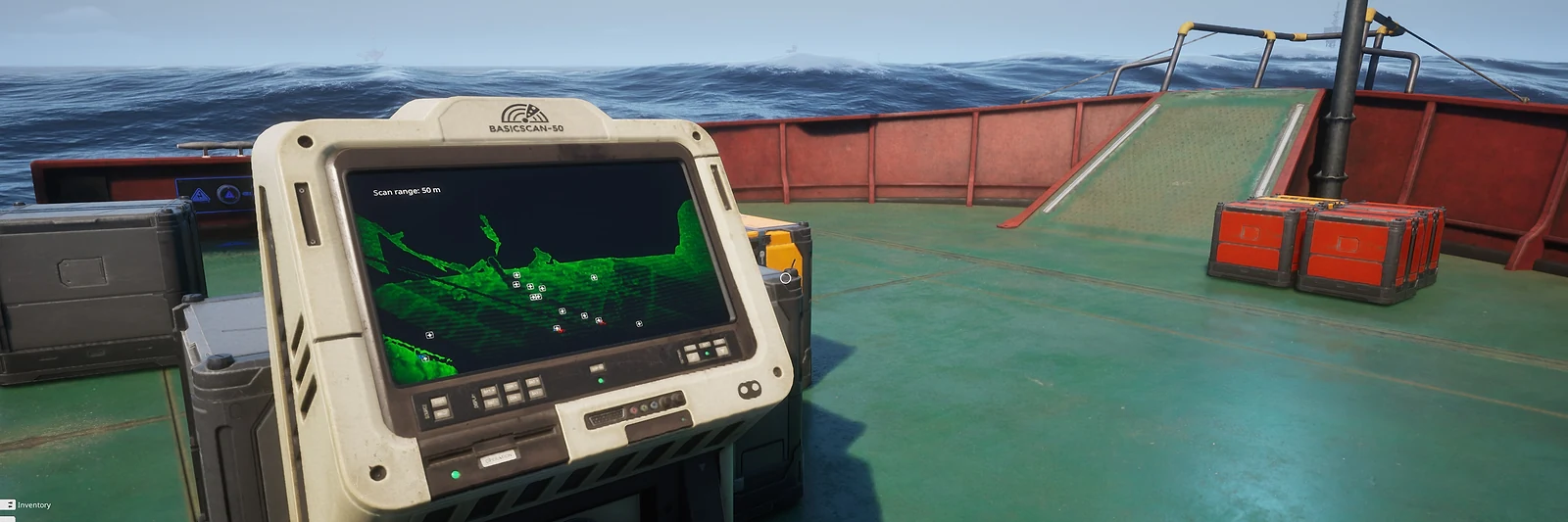
What the screen shows comes from the official Update 02 screenshot (A). Placement, the add-on and the recipes are cross-checked (B) between Steam answers, the community wiki and the game 0.8.5 item data. Single reports are in the player reports box.
What the Sonar Shows
The screen shows the seabed in green and marks ores and other objects with a + sign. In the official screenshot the unit reads BASICSCAN-50 and the screen says "Scan range: 50 m".
Official (A). Official Update 02 press-kit screenshot, February 11, 2026, matching player descriptions from February 2026. Sources: Official press kit: Update 02 screenshot of the Scan-50 sonar (February 11, 2026) · Steam discussion: what the sonar shows (February 10, 2026) · Steam discussion: sonar placement and screen (February 12, 2026)
It also picks up things below the seabed, such as hidden rooms under a location.
Cross-checked (B). February 2026 Steam answer and the item description in the community listing labeled game 0.8.5. Sources: Steam discussion: what the sonar shows (February 10, 2026) · Community item listing: Scan-50 Sonar (game 0.8.5)
The screen has no key or legend: every object shows as the same + sign.
Cross-checked (B). Two Steam threads, February 2026. Sources: Steam discussion: what the sonar shows (February 10, 2026) · Steam discussion: sonar placement and screen (February 12, 2026)
Update 02 added the sonar module, which scans the ocean floor for resources, including the new ore.
Official (A). Official Update 02 announcement, February 11, 2026. Sources: Official Steam announcement: Update 02, Ocean – The Final Frontier (February 11, 2026)
Mine the ores you find with the dismantle tool; the ores and mining guide lists what each one gives.
Where to Put the Sonar
The sonar scans in the direction it faces, ahead and down, not all around the boat.
Cross-checked (B). Steam answers from February 2026 and August 31, 2026, the day of Update 5.5. Sources: Steam discussion: what the sonar shows (February 10, 2026) · Steam discussion: sonar placement and screen (February 12, 2026) · Steam discussion: finding the Deep Scan-500 (August 30, 2026)
Most players set it up in or beside the wheelhouse so they can see it while steering, facing the way they want to look. Some build two or three, facing forward, left and right.
Cross-checked (B). Several players on two Steam threads, February and March 2026. Sources: Steam discussion: where players put the Scan-50 and Deep Scan add-on (March 17, 2026) · Steam discussion: sonar placement and screen (February 12, 2026)
How to Unlock and Build It
Scan-50 Sonar
Unlocks at skill Tier 15 · 5 electricity to craft
- 2 Alloy Frame
- 1 Battery Cell
- 1 Display Screen
- 1 Connector Ports
- 1 Logic Chip
- 1 Data Storage Chip
- 1 Power Core
Cross-checked (B). Game 0.8.5 item data (build 25191271, September 15, 2026) matching wiki Crafting revision 7364. Sources: Community wiki: Crafting table (revision 7364) · Community item listing: Scan-50 Sonar (game 0.8.5)
Deep Scan-500 Add-On
Unlocks at skill Tier 23 · 5 electricity to craft
- 1 Advanced Alloy Mesh
- 1 Reactive Core
Cross-checked (B). Game 0.8.5 item data (build 25191271, September 15, 2026) matching wiki Crafting revision 7364. Sources: Community wiki: Crafting table (revision 7364) · Community item listing: Deep Scan-500 Add-On (game 0.8.5)
Plan the points for Tier 15 and Tier 23 in the Skill Planner.
The Deep Scan-500 Add-On
Fit the Deep Scan-500 Add-On to the back of the Scan-50 Sonar. Drop it behind the sonar and it snaps into place.
Cross-checked (B). Three players on a September 6, 2026 Steam thread, after Update 5.5, and the community listing labeled game 0.8.5. Sources: Steam discussion: where to install the Deep Scan-500 add-on (September 6, 2026) · Community item listing: Deep Scan-500 Add-On (game 0.8.5)
With the add-on the sonar shows much more of the terrain, including deep places that are hard to reach.
Cross-checked (B). Steam answers from February and March 2026 and the community listing labeled game 0.8.5. Sources: Steam discussion: what the sonar shows (February 10, 2026) · Steam discussion: where players put the Scan-50 and Deep Scan add-on (March 17, 2026) · Community item listing: Deep Scan-500 Add-On (game 0.8.5)
What Players Find With It
Players use it to spot hidden places under the sea, such as seed vaults and seed pods, while sailing past.
Cross-checked (B). Several players on two Steam threads, February and March 2026. Sources: Steam discussion: what the sonar shows (February 10, 2026) · Steam discussion: where players put the Scan-50 and Deep Scan add-on (March 17, 2026)
Compare what you spot with the coordinates on the interactive map, and see the underwater caves guide before you dive.
Player reports, not yet verified (C)
Each of these has only one source so far. Single sources from February to August 2026; not checked in the current game.
The community item listing gives the Scan-50 Sonar a weight of 200 kg; players add that it takes up a lot of room on the boat.
Sources: Community item listing: Scan-50 Sonar (game 0.8.5) · Steam discussion: where players put the Scan-50 and Deep Scan add-on (March 17, 2026)One player points out that the screen gives no depth reading.
Sources: Steam discussion: sonar with no depth reading (June 13, 2026)One player has seen + marks move and disappear while the boat was stopped, and thinks they may be fish.
Sources: Steam discussion: sonar placement and screen (February 12, 2026)One player found the Deep Scan-500 in a hidden room and then saw it ready to learn in the skills menu after restarting the game.
Sources: Steam discussion: finding the Deep Scan-500 (August 30, 2026)One player says the sonar made the quest location Mother easy to find under the sea.
Sources: Steam discussion: what the sonar shows (February 10, 2026)
Sonar FAQ
How does the sonar work in The Last Caretaker?
The Scan-50 Sonar shows the seabed in green and marks ores and other objects with a + sign, up to a 50 m scan range in the official screenshot. It scans in the direction it faces, ahead and down, and it also picks up things below the seabed.
Where should you put the sonar on your boat?
In or beside the wheelhouse, facing the way you want to look, so you can watch it while steering. It scans in the direction it faces, so some players build two or three facing forward, left and right.
How do you unlock the sonar?
The Scan-50 Sonar unlocks at skill Tier 15 and needs 2 Alloy Frames, a Battery Cell, a Display Screen, Connector Ports, a Logic Chip, a Data Storage Chip and a Power Core. The Deep Scan-500 Add-On unlocks at Tier 23 and needs an Advanced Alloy Mesh and a Reactive Core.
How do you use the Deep Scan-500 add-on?
Fit it to the back of the Scan-50 Sonar: drop it behind the sonar and it snaps into place. The sonar then shows much more of the terrain.
What do the + signs on the sonar mean?
They mark ores and other objects. The screen has no key, so every object looks the same until you go and look.
All sources
- Official Steam announcement: Update 02, Ocean – The Final Frontier (February 11, 2026)
- Official press kit: Update 02 screenshot of the Scan-50 sonar (February 11, 2026)
- Community wiki: Crafting table (revision 7364)
- Community item listing: Scan-50 Sonar (game 0.8.5)
- Community item listing: Deep Scan-500 Add-On (game 0.8.5)
- Steam discussion: what the sonar shows (February 10, 2026)
- Steam discussion: sonar placement and screen (February 12, 2026)
- Steam discussion: where players put the Scan-50 and Deep Scan add-on (March 17, 2026)
- Steam discussion: finding the Deep Scan-500 (August 30, 2026)
- Steam discussion: where to install the Deep Scan-500 add-on (September 6, 2026)
- Steam discussion: sonar with no depth reading (June 13, 2026)